

Is IPTV safe? In brief
- The technology is safe. The risks come from the seller, the app and the device.
- In a 2025 survey of UK viewers, most people who had used illegal streams reported malware scares, and more than a third had lost money to criminals.
- Install players from official app stores only, and avoid uncertified Android boxes: the FBI found more than a million infected.
- Buy from a business that publishes its name, prices and terms, and pay by a traceable method.
Is IPTV safe? The short answer
IPTV, internet protocol television, is simply television delivered over your broadband. BBC iPlayer, ITVX, Sky Stream and Freely all work this way, and nobody worries about watching them. The technology is not the problem.
What makes IPTV feel risky is everything that surrounds the unlicensed part of the market. A seller with no name, an app from a download site, a box from an online marketplace: each is a way for someone to get your money, your card details or a foothold on your home network. Avoid those, and IPTV is as safe as any other subscription.
So is IPTV dangerous? Not in itself. A secure IPTV set-up comes down to three choices: a service you can identify, an app from an official store and a certified device. The rest of this page shows how to get each one right.

Where the risks really come from
IPTV security issues rarely lie in the streams themselves. IPTV security comes down to three things: the app you install, the box you buy and the person you pay. The IPTV illegal streaming risk UK viewers read about belongs almost wholly to unlicensed services.
| Source of risk | What can go wrong | How to avoid it |
|---|---|---|
| An unlicensed seller | The service stops, your money is gone, your details are exposed | Buy from a business with a name, address and terms |
| A modified or unofficial app | Malware that watches what you type or uses your connection | Install players from official app stores |
| An uncertified Android box | Malware installed before you even open the box | Choose a Google-certified device or a known brand |
| A payment method with no protection | No way to get money back | Pay by card or another traceable method |
| Fake renewal messages | Card details handed to a scammer | Only renew through the channel you used to buy |
| Login details shared in public | Someone else uses your subscription | Keep your login private, like a password |
Most problems people report fall into the first three rows, and most of those start with a price that looked too good to be true.

What UK research found
The risks are not theoretical. Several studies in 2025 put numbers on them.
A survey of more than 2,000 UK consumers for BeStreamWise, an industry awareness campaign, found that 39 per cent of people who had used illegal streams in the previous year had lost money after being targeted by criminals, and 65 per cent had had a security scare such as malware or malicious pop-ups. Only 27 per cent said they had never had a problem, as Broadband TV News reported.
A study by the brand protection company Corsearch found that 76 per cent of the 30 most-visited pirate sites in the UK exposed visitors to scams, financial fraud or explicit content, including automatic downloads of harmful software, according to Advanced Television.
Enforcement reached customers too. In December 2025 the anti-piracy body FACT contacted more than a thousand people across the UK, warning them to stop using illegal streaming services, after police seized the customer records of sellers of so-called loaded devices, as Advanced Television also reported.
Put together, the picture is consistent. The people who get hurt are overwhelmingly those who buy from the unlicensed end of the market.
Malware in apps and APK files
Player apps such as TiviMate and IPTV Smarters Pro are legitimate software. The danger is in copies of them.
- Modified apps. Files sold or shared as "premium unlocked", "modded" or "cracked" are the original app with someone else's code added. That code runs on a device connected to your home network, and you have no way to know what it does.
- Unofficial download sites. Search for almost any popular player and you will find sites with nearly identical names offering a download. Some are harmless mirrors. Some are not.
- Codes from strangers. Downloader codes are a convenient way to fetch an app on a Fire TV Stick, but a code simply points to a file. A code posted by a stranger can point to anything.
Safe sources are the official stores: Google Play, Amazon, Apple and the one on your Smart TV. Each vets what it lists. Where a player is not in a store, the developer's own website is the next best source. Our page on Android IPTV apps explains how to install from a file safely, and our page on IPTV on a Firestick covers Fire TV.
The same caution applies to anything that claims to bring IPTV to a device that cannot run players. There is no genuine "Sky Glass IPTV APK", for example, because Sky Glass cannot install apps at all; our page on what does work on Sky Glass explains the method that does.
Malware in boxes: the BADBOX warning
In June 2025 the FBI issued a public warning about BADBOX 2.0, a criminal operation that had infected more than a million low-cost Android devices worldwide, most of them unbranded TV streaming boxes. Some were infected before they were sold. Others were infected through "required" apps the owner was told to install during set-up. Infected devices were enrolled in a network used for advertising fraud and to hide other criminal traffic. The FBI's alert lists the signs:
- the box comes from an unofficial app marketplace, or relies on one;
- set-up asks you to switch off Google Play Protect;
- it is a generic streaming device advertised as "unlocked" or able to show free content;
- your network shows unexplained traffic.
The defence is simple. Choose a Google-certified Android TV or Google TV device, a Fire TV Stick, an Apple TV or a television's own system, and never a box sold with channels already loaded. Our page on IPTV boxes and devices explains how to tell a certified device from the rest.

Payment scams and fake sellers
Most money lost to IPTV is lost before a single channel is watched.
- Payment by gift card, cryptocurrency or transfer to a personal account. These are chosen because they cannot be reversed. A business that wants repeat customers takes payment by card or another traceable method.
- The seller who disappears. An unlicensed service can be shut down, lose its source or just go quiet. You may pay for a year and get two weeks, and there is no one left to ask for the money back.
- Lifetime deals. A single payment cannot fund a service that costs money every month. The lifetime is usually the seller's.
- Fake reviews. Clusters of five-star reviews in a single week are a classic sign. Since April 2025, writing or commissioning fake reviews has been banned in the UK, but enforcement takes time. Our article on IPTV on Reddit, forums and Trustpilot shows how to read reviews with care.

Phishing: fake renewal and "account suspended" messages
A newer scam targets people who already have a subscription. A message arrives by text, email or WhatsApp saying your IPTV account is about to expire, or has been suspended, with a link to renew. The link leads to a page that collects card details.
Three habits protect you.
- Renew only through the channel you used to buy. If you ordered in a particular chat or on a particular site, renew there, not through a link that arrived on its own.
- Check the sender. A message from an unfamiliar number or address is not from your provider, whatever it says.
- Never type card details into a page you reached from a message. A genuine provider can tell you the price and how to pay in the same conversation.

Your personal data
Every subscription involves some personal data: a name, a phone number or email address, a payment. With a legitimate business, that data is covered by a privacy policy and UK data protection law. With an unlicensed seller, it sits in a database run by people who are already breaking the law.
When those sellers are raided, investigators take their records. That is how FACT was able to contact more than a thousand customers in 2025. And if a seller is careless rather than raided, the same records can leak.
Two simple precautions help wherever you buy. Use a password for your IPTV login that you use nowhere else, and never send copies of identity documents to a seller who has not explained why it needs them.

Is IPTV Smarters safe?
Is IPTV Smarters legit? Yes. It is a real player from a real developer, and it contains no channels.
This question comes up so often that it deserves its own answer. IPTV Smarters Pro is a player: an app that shows the channels from a login you enter. It contains no channels and is not itself a service, legal or otherwise.
The genuine app, installed from an official store or the developer's own site, is as safe as any other. The risks are the same as for any popular app: lookalike download sites, modified versions that promise free premium features, and "Smarters subscriptions" sold by people who have nothing to do with the app. Our IPTV Smarters Pro page explains how to get it safely.

Is it safe to use IPTV without a VPN?
Yes, for a licensed service. Sellers of unlicensed services often tell customers to use a VPN, because their streams are blocked by UK broadband providers and their customers have reason to hide what they watch. A licensed service has no such problem.
More importantly, a VPN does nothing about the real risks on this page. It does not remove malware from an app, does not make an uncertified box safe and does not get money back from a seller who has vanished. Our page on what a VPN can and cannot do for IPTV explains what a VPN is useful for.
Is IPTV safe and legal? Not always the same thing
Safe and legal overlap, but they are not the same question. A licensed service is legal; whether it is safe still depends on the app and the device you use. An unlicensed service is illegal to sell and unlawful to use knowingly, and it is also where most of the safety problems on this page come from.
The simplest way to deal with both is to start with the service. Our page on whether IPTV is legal in the UK explains where the legal line falls, and our introduction to what IPTV is explains why the technology itself is not the issue.

How to tell a legit IPTV service from the rest
IPTV trust is built on things you can check. Whether you can trust IPTV sellers you have never met depends on what they put in writing.
A genuine IPTV service looks like any other business you would buy from. These are the signs, and the opposite signs to walk away from.
| A legit IPTV service | A service to avoid |
|---|---|
| A company name and registered address | A brand name and a messaging account |
| One public price list | A different price for each buyer |
| Written terms and a refund policy | A promise in a chat window |
| Payment by card or another traceable method | Gift cards, cryptocurrency or a personal account |
| Works with standard player apps | Requires its own app from a download link |
| Believable channel claims | Tens of thousands of channels, every premium channel |
| A statement of what it is licensed to carry | Silence, or "don't worry about that" |
No single sign proves anything. Three or four from the right-hand column together are as clear a warning as you will get. Our page on choosing the best IPTV in the UK goes through the checks in more detail.
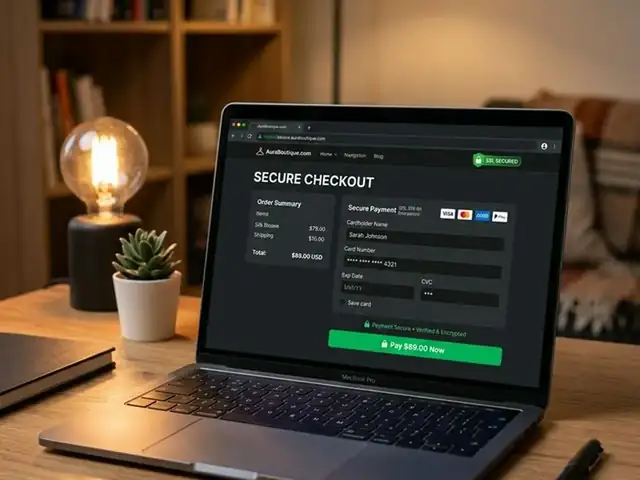
A safety checklist before you pay

- Find the company. Look for a legal name, a company number and an address. Check that the company exists.
- Read the terms and the refund policy before paying, not after.
- Check how you pay. Card or another traceable method, to a business, not a personal account.
- Use the official app. Install the player from an official app store or the developer's own site.
- Use a certified device. No unbranded boxes and nothing sold "fully loaded".
- Start small. Use a free trial if there is one, and a short term before a long one.
- Keep your login private, with a password you use nowhere else.

If something has already gone wrong

If you think you have been caught out, act quickly.
| What happened | What to do now |
|---|---|
| You paid a seller who has disappeared | Contact your bank or card provider at once. Card payments can sometimes be disputed; transfers and gift cards rarely can |
| You typed card details into a suspicious page | Call your bank, cancel the card and watch your statements |
| A box or app behaves strangely | Unplug it from your network, remove any app you did not install from an official store, and consider a factory reset. Replace an uncertified box rather than trying to clean it |
| You reused a password | Change it everywhere you used it |
| You were defrauded | Report it to the police's fraud reporting service as well as to your bank |
Where to report an IPTV scam in the UK
Reporting helps the next person, and a quick report can help you get money back.
| What happened | Where to report it |
|---|---|
| A seller took your money or vanished | Your bank or card provider first, then Action Fraud; in Scotland, Police Scotland on 101 |
| A fake renewal or "account suspended" email | Forward it to the National Cyber Security Centre at [email protected] |
| A scam text message | Forward it to 7726, the free spam-reporting number on UK mobile networks |
| A box sold with channels already loaded | Trading Standards, through the Citizens Advice consumer helpline, or Advice Direct Scotland |
| An app that behaves like malware | Remove it, then report it to the store or site it came from |
Before anything disappears, take screenshots of the chat, the payment and the seller's page. They are what your bank and the police will ask for first.

How IPTV King approaches safety
We have built IPTV King to pass the checks on this page.
- Who we are is on the about page.
- Prices are published for every plan and term on our plans and prices page, the same for everyone.
- Payment is by traceable methods only.
We accept Visa, Mastercard, PayPal, Apple Pay, Google Pay and bank transfer.
- Terms, privacy and refunds are written down in our refund policy, terms of service and privacy policy.
- Apps are the standard players from official stores. We never ask you to install an app of our own from a link.
Our trial: 30 days for £10
Try IPTV King for 30 days for £10, on your own broadband and your own devices, before you choose a longer plan. Order the trial on WhatsApp and your login arrives in the same chat once it is paid.
Our plans, with every price published for everyone:
IPTV Premium UK
1 screen
Best for: One HD or Full HD television
1
screen at a time
HD and Full HD
picture quality
Term in months
You save £20.00 on 12 months
- HD and Full HD channels on one screen.
- Live TV channels
- TV guide (EPG) for the live channels
- Films and series on demand
- Catch-up TV
- Support 24 hours a day, every day
Pay by Visa, Mastercard, PayPal, Apple Pay, Google Pay or bank transfer
IPTV 4K Ultra
1 screen
Best for: A 4K television and fast broadband
1
screen at a time
Up to 4K
picture quality
Term in months
You save £20.00 on 12 months
- Everything in Premium UK, plus 4K channels, on one screen.
- Live TV channels
- TV guide (EPG) for the live channels
- Films and series on demand
- Catch-up TV
- Support 24 hours a day, every day
Pay by Visa, Mastercard, PayPal, Apple Pay, Google Pay or bank transfer
IPTV 8K Ultra Max
1 screen
Best for: The highest level we sell, on a 4K or 8K television
1
screen at a time
4K, plus some 8K
picture quality
Term in months
You save £30 on 12 months
- Everything in 4K Ultra, plus a selection of 8K content, on one screen.
- Live TV channels
- TV guide (EPG) for the live channels
- Films and series on demand
- Catch-up TV
- Support 24 hours a day, every day
Pay by Visa, Mastercard, PayPal, Apple Pay, Google Pay or bank transfer
IPTV Family Pack
2 screens
Best for: Homes that watch on 2 to 5 screens at once
2
screens at once
Up to 4K
picture quality
Screens at the same time
Term in months
You save £30 on 12 months
- 4K Ultra quality on 2 screens at the same time.
- Live TV channels
- TV guide (EPG) for the live channels
- Films and series on demand
- Catch-up TV
- Support 24 hours a day, every day
Pay by Visa, Mastercard, PayPal, Apple Pay, Google Pay or bank transfer
Not ready to choose? Try IPTV King for 30 days for £10, on your own broadband and devices.
Try 30 days for £10More articles on using IPTV safely and getting the best from it are on the IPTV King blog.
Questions people ask
Is IPTV safe to use?
IPTV as a technology is as safe as any streaming service, and licensed services such as BBC iPlayer and Sky Stream use it. The risks come from unlicensed sellers, modified apps and unbranded boxes. Use a service that publishes who it is, install players from official app stores, and choose a certified device, and IPTV is no riskier than any other subscription.
Can IPTV give you a virus?
The service itself cannot, but the things around it can. Modified app files, apps from unofficial download sites and cheap uncertified Android boxes are common ways malware reaches a home network. In 2025 the FBI warned that more than a million such devices had been infected, in many cases before they were sold.
Is IPTV Smarters safe?
IPTV Smarters Pro is a player app, and the genuine app from an official app store is as safe as any other. The risk is in lookalike download sites and modified versions that claim to unlock paid features. Get it from an official app store or the developer's own site, and never by following a link someone messaged you.
Is it safe to use IPTV without a VPN?
Yes, for a licensed service. A VPN does not protect you from the real risks of IPTV, which are malware, payment fraud and sellers who disappear. A VPN cannot clean an infected app or get your money back. Our page on using a VPN with IPTV sets out where a VPN helps and where it does not.
How do I know if an IPTV service is legit?
A legitimate service tells you who it is: a company name, a registered address, published prices, written terms and a refund policy. It takes payment by card or another traceable method, works with standard player apps, and makes believable claims about its channels. Tens of thousands of channels for a few pounds, payment by gift card only, or support only through a messaging account are warning signs.
Can I get in trouble for using illegal IPTV?
Yes. In the UK, knowingly using an unlicensed service can be an offence, and in December 2025 the industry body FACT warned more than a thousand people to stop after police seized sellers' customer records. Our page on whether IPTV is legal in the UK explains the law.
Is IPTV a scam?
IPTV itself is not: it is simply television over the internet, and BBC iPlayer, Sky Stream and EE TV all use it. The scams are sellers who take payment for services that vanish, fake renewal messages, and malware hidden in modified apps. A named company, card payment and the official player apps rule most of them out.
Is IPTV dangerous?
Not in itself. The dangers come from where you get it: anonymous sellers can take your money and card details, modified apps and unbranded boxes can carry malware, and fake 'account suspended' messages are used for phishing. The checklist on this page shows how to avoid each one.
Related guides
 Is IPTV legal in the UK? What the law says in 2026Where the legal line sits, which laws apply to sellers and viewers, the penalties, and how to check a service.17 min read
 IPTV Reddit: what Reddit, forums and Discord can and cannot tell you about UK IPTVWhat Reddit, forums, Discord and Trustpilot are good for, how to spot a seller posing as a customer, and how to check a service yourself.16 min read
 IPTV box: the best devices for IPTV in the UKSticks, boxes, Apple TV and Smart TVs compared for IPTV, with the specifications that matter and the boxes to avoid.17 min read
 IPTV subscription UK: IPTV King plans, prices and what each costs per monthEvery plan and its price for each term, what a subscription includes, and how to order.34 min read