

Key takeaways
- It is a player, not a television service. Purple IPTV Player (published by Purple Smart TV) is an empty video player interface. You bring your own M3U playlist or Xtream Codes login.
- One developer, several device-specific builds. Unlike players that ship one app everywhere, Purple Smart TV publishes distinct editions—including IPTV Smart Purple Player (TV) for Android TV and Fire OS, Purple Playlist Player on the UK Apple App Store for iPhone, iPad and Apple TV, and Purple Web Player (player.purpletv.app) for browsers.
- Check your Smart TV or Firestick OS first. At the time of writing,
purplesmarttv.comlists the Samsung build for the Samsung App Store while the LG build is marked Coming soon to the LG Content Store; on Fire TV, only Fire OS sticks accept Android APK installs. - Works with any IPTV King plan. Every IPTV King login includes the Xtream Codes and M3U details that Purple IPTV Player asks for. Test it with our 30 days trial for £10 or compare fixed terms on the plans and prices page.

What Purple IPTV Player actually is
Search for purple iptv player, iptv purple player or purple smart tv iptv and you will come across a whole family of applications wearing the same violet branding on Android boxes, Firesticks, iPhones and Smart TVs. For anyone setting up internet television for the first time, that raises two immediate questions: what does the app actually do, and why are there so many versions of it?
First, the fundamental distinction that applies to every app in our IPTV player apps hub: Purple IPTV Player is a media player, not a television provider.
When you install the app and open it for the first time, there are no channels, no films and no sports broadcasts inside it. As the developer, Purple Smart TV LLC, explains on its official UK Apple App Store listing for Purple Playlist Player, the application is a media player built to play your own personal audio and video media or streams from your internet service provider, HTTP server, local network or NAS.
Think of the player in the same way you think of a web browser or VLC media player:
- The player app (Purple Smart TV, IPTV Smarters Pro or TiviMate) provides the on-screen menus, the remote-control navigation, the electronic programme guide (EPG) grid, the favourites list and the parental PIN lock.
- Your IPTV subscription (or a lawful free public playlist) provides the server address and account credentials that populate those menus.
Keeping those two parts separate is a real advantage for a UK household. Because your IPTV King login follows standard industry formats, you are not locked into one interface. You can run Purple IPTV Player in the bedroom, TiviMate on an Android TV box in the lounge, and Purple Playlist Player on an iPad in the kitchen using the same subscription. If you are new to how internet streams are delivered over broadband, our plain-English guide to what IPTV is in the UK covers the basics.

The Purple Smart TV app family: which version fits your device?
Many people get confused when they search an app store for purple iptv and see several slightly different names—IPTV Smart Purple Player, Easy Purple Player, Onestream Purple Player, Purple Lite and Purple Playlist Player.
Unlike TiviMate (which focuses on a single Android TV / Fire OS television application), Purple Smart TV publishes a catalogue of purpose-built players across different operating systems. According to the developer's official application directory on purplesmarttv.com, here is what each official build is designed for and where it runs:
Official app name on purplesmarttv.com | Target platform | What the developer states it is built for | Where to get it |
|---|---|---|---|
| IPTV Smart Purple Player (TV) | Android TV & Fire OS Firesticks | Flagship big-screen player with multi-screen, parental controls and EPG support | Official download link on purplesmarttv.com |
| IPTV Smart Purple Player (Mobile) | Android phones & tablets | Touchscreen build of the main player for Android mobile devices | Official Android download on purplesmarttv.com |
| Easy Purple Player (TV & Mobile) | Android TV boxes & Android phones | Lightweight, simplified interface for straightforward channel browsing | Official download directory on purplesmarttv.com |
| Onestream Purple Player (TV & Mobile) | Android TV boxes & Android phones | Single-stream focused player built for quick startup | Official download directory on purplesmarttv.com |
| Purple Lite App | Low-spec Android & iOS devices | Minimalist player built for older or low-memory hardware | purplesmarttv.com (Android) & Apple App Store (iOS) |
| Purple Playlist Player | iPhone, iPad & Apple TV (tvOS) | Official App Store player for M3U playlists and streams on Apple devices | Apple App Store (id1547219704) |
| Purple Web Player | Desktop & mobile web browsers | Browser-based player that streams without installing local software | player.purpletv.app |
| Easy IPTV Player (Desktop) | Windows PC & macOS (Apple Silicon & Intel) | Desktop applications for Windows and Mac computers | Listed under Windows and macOS on purplesmarttv.com |
| Purple Player (Samsung) | Samsung Smart TVs (Tizen) | Listed by the developer as available from the Samsung App Store (at the time of writing) | Samsung Smart TV App Store |
| Purple Player (LG) | LG Smart TVs (webOS) | Listed by the developer on purplesmarttv.com as Coming soon to the LG Content Store (at the time of writing) | Check LG Content Store for updates, or use an alternative player or HDMI stick |
Watch out for unrelated lookalike apps in app stores
Because the word "Purple" is a common colour name, searching the Apple App Store or Google Play Store for "purple iptv" also returns third-party apps from completely unrelated developers that use a purple icon and charge steep weekly or monthly in-app subscriptions.
Before you install or pay for an optional premium upgrade inside an app, check the Developer line on the store listing:
- On the Apple App Store, the genuine Purple Playlist Player (
id1547219704), Purple Easy IPTV Player (id6752685536) and Purple Lite (id6749171817) listings identify the developer as Purple Smart TV LLC and link topurpletv.appin their terms and privacy policy. - On Android TV and Fire OS, start from the developer's own website (purplesmarttv.com) rather than typing random Downloader codes copied from a comment thread or social media post.
Our guide to staying safe from fake IPTV apps and scams explains how to check any app's permissions and developer details before you enter your login.

How to install Purple IPTV Player safely on each UK device
How you install the player depends on whether your device's official store carries it directly or whether you are using an Android / Fire OS device where the developer distributes the installer package (APK) from its own site.
1. Android TV and Google TV boxes
If you use a certified Android TV or Google TV box (such as a Sony or Philips Google TV television, a Google TV Streamer, a Chromecast with Google TV or an Nvidia Shield), check the Google Play Store first. Apps installed through the Play Store are scanned by Google's Play Protect security system and update automatically in the background.
If you want one of the specific TV editions listed on purplesmarttv.com—such as IPTV Smart Purple Player (TV) or Easy Purple Player (TV)—you can download the installer directly from the developer's website using a browser or the Downloader app on your box. Our guide to installing IPTV player apps on Android safely walks through the exact Android permission steps and explains why you should switch "Install unknown apps" back off once the player is installed.
2. Amazon Fire TV Stick (Fire OS vs Vega OS)
Search interest for purple player firestick is high in the UK because Amazon's sticks are present in so many living rooms. Before you begin, check which operating system your Fire TV Stick runs:
- Fire TV Sticks running Fire OS (Fire OS 7 and Fire OS 8): These models—including the Fire TV Stick 4K Max (1st and 2nd Gen), Fire TV Stick 4K (1st and 2nd Gen), Fire TV Cube and Fire TV Stick Lite—are built on Android and can install Android APK packages from the developer's website. You can verify the operating system of each generation in Amazon's official Fire TV device specifications.
- Newer Fire TV Sticks running Vega OS: Starting with the Fire TV Stick 4K Select, Amazon's newer sticks run Vega OS, a Linux-based system that does not run Android APK files and has no sideloading toggle. On a Vega OS stick, you can only install apps listed inside the Amazon Appstore itself.
On a compatible Fire OS stick, the installation follows the same clean pattern as our Firestick IPTV Smarters installation guide and our complete Firestick device guide:
- Install the Downloader app from the official Amazon Appstore on your Fire TV Stick.
- Allow Downloader to install apps. Open Settings → My Fire TV → Developer Options → Install unknown apps and switch it on for Downloader only. (If Developer Options is hidden, open Settings → My Fire TV → About, highlight your Fire TV Stick model name, and press the select button on your remote seven times.)
- Fetch the official installer from the developer. Open Downloader and navigate directly to the developer's website at purplesmarttv.com to download the current Android TV build (IPTV Smart Purple Player (TV) or Easy Purple Player (TV)). Going directly to the developer's own page avoids relying on third-party shortcodes that can expire or point to unofficial files.
- Click Install when the Android package installer prompt appears, then delete the temporary
.apkinstaller file when Downloader offers to remove it so you do not waste your stick's internal storage. - Turn off "Install unknown apps" under Developer Options once the player is on your home screen.
3. iPhone, iPad and Apple TV 4K
On Apple hardware, no sideloading or developer toggle is needed. Open the official UK App Store on your iPhone, iPad or Apple TV 4K and view Purple Playlist Player by Purple Smart TV LLC (or the lightweight Purple Lite / Purple Easy IPTV Player builds by the same developer).
According to the UK App Store listing, Purple Playlist Player is free to download and use, with an optional in-app premium upgrade managed through your Apple ID if you want to unlock its extra convenience features. Installing it on an iPhone first is also a handy way to test a new login, because you can copy and paste your server URL and password directly from your WhatsApp chat without typing character by character with a television remote. For more Apple-specific tips—including 50Hz frame-rate matching on tvOS—see our Apple TV, iPhone and iPad IPTV guide.
4. Samsung Smart TVs, Windows, Mac and Web Browsers
- Samsung Smart TVs: Open the Samsung App Store on your television and search for Purple Player (listed for Samsung at the time of writing; the developer's site lists the LG webOS version as Coming soon to the LG Content Store at the time of writing, so LG owners should check our Smart TV IPTV guide or our IBO Player guide and Smart IPTV (SIPTV) guide for native webOS options).
- Web Browsers (Windows, Mac, Linux, Chromebook): Purple Smart TV hosts a browser-based player at player.purpletv.app, which lets you test an Xtream Codes login in a desktop browser tab without installing local software, alongside the standalone Windows and macOS desktop builds listed on
purplesmarttv.comand the free desktop players covered in our Windows and Mac IPTV guide.
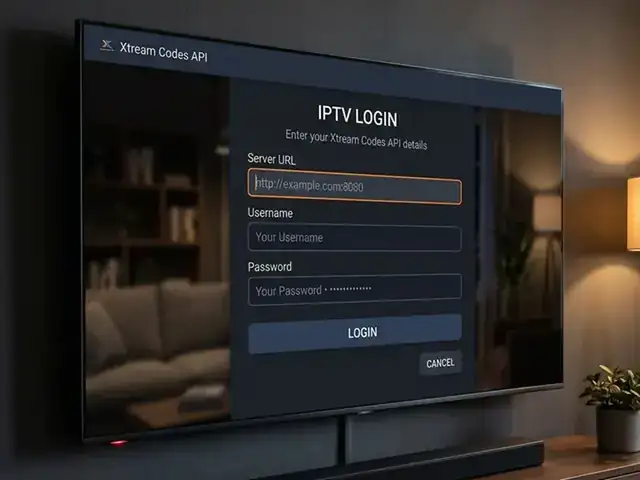
How to sign in to Purple IPTV Player (Xtream Codes & M3U)

Once the app is open on your screen, adding your subscription takes a couple of minutes. A IPTV King order gives you both an Xtream Codes login (a server URL, a username and a password) and an M3U playlist link.
Where the app offers both options, choose Xtream Codes API for daily television viewing. As we explain in our dedicated Xtream Codes login guide, signing in with Xtream Codes separates live TV, on-demand films, series and the programme guide (EPG) automatically, whereas a raw M3U playlist URL often requires you to paste a second XMLTV link for the programme guide.
- Open Purple IPTV Player and accept the initial media-player disclaimer on first launch.
- Select your sign-in method. Choose Login with Xtream Codes API (sometimes labelled Add Playlist → Xtream Codes depending on whether you are using the TV, Mobile or Apple TV edition).
- Enter a profile or playlist name. Type any label you like, such as
Living RoomorIPTV King. - Enter your server URL, username and password. Copy and paste these if you are on a phone, tablet or computer. If you are typing with a TV remote, watch carefully for:
http://versushttps://at the start of the server address;- colons (
:), dots (.) and port numbers; - capital versus lower-case letters in the username and password;
- accidental trailing spaces added by an on-screen keyboard after a full stop.
- Load your channels and EPG. Select Add User or Connect. The first load takes thirty to ninety seconds while the player downloads the channel groups and programme guide schedule; subsequent launches open much faster.
Once the home dashboard appears, spend five minutes tidying it up:
- Add your daily channels to Favourites by long-pressing the select button on a channel in the live list.
- Hide or lock categories you do not use using the Parental Control PIN in the app's settings.
- Check the EPG time offset if programme times appear an hour out after the UK clocks change between GMT and BST in March or October (see our IPTV EPG troubleshooting guide).

Key features of the Purple Smart TV player ecosystem
Why do some UK viewers pick IPTV Smart Purple Player over better-known names? Based on the features documented on purplesmarttv.com and the UK Apple App Store listing for Purple Playlist Player, four practical strengths stand out:
- Multi-screen viewing on the Android TV / Fire OS build: Purple Smart TV describes IPTV Smart Purple Player (TV) as an "Advanced IPTV player with multi-screen, parental controls, and EPG support." Multi-screen lets you place more than one live channel on a big television at once—helpful on busy sports afternoons (see our guide to IPTV for live sports and multi-view). Keep in mind that every active window on screen counts as one simultaneous connection from your provider, so multi-screen viewing requires a multi-connection plan such as our 2-to-5 screen IPTV Family Pack.
- Lightweight variants for older or low-memory hardware: If an older bedroom stick or entry-level Android box feels sluggish running a heavy player, the developer offers Easy Purple Player and Purple Lite App ("Minimalistic app for low-end devices"), which strip back extra dashboard animations so channel lists open with less RAM overhead.
- Browser playback without an install: Having Purple Web Player (
player.purpletv.app) available in a standard browser tab is convenient when you want to check a stream on a work laptop or desktop without installing software. - Optional DVR Recorder Plugin on supported Android devices: On its downloads directory, Purple Smart TV offers a companion Recorder Plugin ("Enable DVR recording capabilities on supported devices"). Before relying on recording, remember that recording a channel uses an active connection and requires sufficient local or USB storage (see our IPTV recording, catch-up and pause guide).

Purple IPTV Player vs IPTV Smarters Pro vs TiviMate

Because your login is not tied to a single application, it helps to compare Purple IPTV Player candidly against the two most popular players in the UK: IPTV Smarters Pro and TiviMate.
| Feature | Purple IPTV Player family | IPTV Smarters Pro | TiviMate |
|---|---|---|---|
| Includes TV channels? | No (media player only) | No (media player only) | No (media player only) |
| Android TV & Fire OS sticks | Yes (IPTV Smart Purple Player TV, Easy, Lite) | Yes | Yes (built specifically for TV remotes) |
| Android phones & tablets | Yes (Mobile & Lite builds) | Yes | No (not designed for touchscreens) |
| iPhone, iPad & Apple TV | Yes (Purple Playlist Player) | Yes (Smarters Player Lite) | No |
| Samsung Smart TVs | Listed on purplesmarttv.com for Samsung App Store (at the time of writing) | Varies by model year and region (check Samsung Apps) | No (requires an external Android/Fire OS device) |
| LG Smart TVs (webOS) | Listed as Coming soon on purplesmarttv.com (at the time of writing) | Varies by model year and region (check LG Content Store) | No (requires an external Android/Fire OS device) |
| Web browser player | Yes (player.purpletv.app) | No standalone universal web player | No |
| Login formats accepted | Xtream Codes API & M3U URLs | Xtream Codes API & M3U URLs | Xtream Codes API, M3U URLs & Stalker Portal |
| Best suited for | Households mixing Fire OS/Android TV, Apple devices and web browser viewing | Simple all-round dashboard across phones, tablets and TVs | The fastest, most traditional sky-style TV guide grid on a living-room box |
In short:
- If you watch almost exclusively on a living-room Android TV box or Fire OS stick with a remote control and want the fastest, most customisable programme guide grid, TiviMate remains the benchmark.
- If you want a familiar four-tile dashboard (Live TV, Movies, Series, Catch Up) with a straightforward free setup across Android and iOS, IPTV Smarters Pro is the most widely documented starting point.
- If you like the Purple Smart TV interface, want a lightweight edition (Easy or Lite) for a lower-powered device, or use Purple Playlist Player on Apple TV / iPad alongside the web player, Purple IPTV Player is a capable alternative.

Troubleshooting common Purple IPTV Player faults
When something does not play as expected in Purple IPTV Player, a quick check shows whether the issue lies in the app's settings, your home network or your login details.
| Symptom | Likely cause | What to do |
|---|---|---|
| "URL error" or login rejected on sign-in | A mistyped character or trailing space in the server address, or an expired subscription term | Re-enter the server URL, username and password carefully (paste on a phone or computer first to verify the login works) |
| Channels load in the list, then fail to play when clicked | Another device in the house is already watching on a 1-screen plan, or your broadband connection has dropped | Stop playback on other screens, or upgrade to the 2-to-5 screen IPTV Family Pack if two people watch at once |
| Picture stalls or buffers at 8pm | Wi-Fi packet jitter between your router and the television, or evening broadband congestion | Check your line speed on Ofcom's broadband checker, wire the TV device with Ethernet or switch to 5 GHz Wi-Fi, and see our 12 fixes for IPTV buffering |
| Sound plays with a black screen (or picture with no sound) | The device's hardware decoder does not support that channel's video or audio codec | Open the player's playback settings and switch the video decoder between Hardware and Software |
| Programme guide (EPG) is blank or 1 hour off | EPG data has not finished downloading, or UK BST/GMT summer time shifted the schedule | Trigger a manual EPG refresh in settings, check your device's clock and time zone, or adjust the EPG time-shift offset by ±1 hour |
| App feels slow after weeks of use on a Firestick | Cached channel logos and EPG data filling the stick's limited storage | On Fire OS / Android TV, open Settings → Applications → Manage Installed Applications → Purple Player → Clear cache (do not click Clear data unless you want to re-enter your login) |
For a full five-minute diagnostic flow when nothing plays at all, follow our IPTV not working troubleshooting guide.

UK legal and TV licence reminder
Because Purple IPTV Player is an empty media player, installing and using the software itself is completely lawful—just like installing VLC or a web browser. What matters under UK law is the service you connect it to:
- Television channels and programmes are protected by copyright, and a legitimate service needs agreements covering what it carries. Our guide on whether IPTV is legal in the UK explains the law and the checks to run on any provider before you pay.
- In the United Kingdom, you also need a valid TV licence whenever you watch or record live television on any channel, through any app and on any device, as well as whenever you use BBC iPlayer. As GOV.UK confirmed for 2026/27, the standard annual TV licence costs £180 from 1 April 2026.

Using Purple IPTV Player with an IPTV King subscription
Once you have installed Purple IPTV Player on your television, streaming stick, tablet or phone, all it needs is an active login. Every IPTV King subscription includes both the Xtream Codes API credentials and the M3U playlist link that Purple Smart TV applications accept.
- New to IPTV King? Start with our 30 days trial for £10 so you can test the stream inside Purple IPTV Player on your own broadband across busy evenings and weekends, with no automatic renewal.
- One HD or Full HD television? IPTV Premium UK starts at £18.99 for 3 months.
- Watching on a 4K Ultra HD set? IPTV 4K Ultra starts at £23.99 for 3 months (and IPTV 8K Ultra Max starts at £29.99 for 3 months).
- Using Purple's multi-screen feature or watching in several rooms at once? Our IPTV Family Pack covers 2 to 5 simultaneous streams, starting at £29.99 for 3 months for 2 screens and £39.99 for 3 months for 3 screens.
IPTV Premium UK
1 screen
Best for: One HD or Full HD television
1
screen at a time
HD and Full HD
picture quality
Term in months
You save £20.00 on 12 months
- HD and Full HD channels on one screen.
- Live TV channels
- TV guide (EPG) for the live channels
- Films and series on demand
- Catch-up TV
- Support 24 hours a day, every day

Pay by Visa, Mastercard, PayPal, Apple Pay, Google Pay or bank transfer
IPTV 4K Ultra
1 screen
Best for: A 4K television and fast broadband
1
screen at a time
Up to 4K
picture quality
Term in months
You save £20.00 on 12 months
- Everything in Premium UK, plus 4K channels, on one screen.
- Live TV channels
- TV guide (EPG) for the live channels
- Films and series on demand
- Catch-up TV
- Support 24 hours a day, every day
Pay by Visa, Mastercard, PayPal, Apple Pay, Google Pay or bank transfer
IPTV 8K Ultra Max
1 screen
Best for: The highest level we sell, on a 4K or 8K television
1
screen at a time
4K, plus some 8K
picture quality
Term in months
You save £30 on 12 months
- Everything in 4K Ultra, plus a selection of 8K content, on one screen.
- Live TV channels
- TV guide (EPG) for the live channels
- Films and series on demand
- Catch-up TV
- Support 24 hours a day, every day
Pay by Visa, Mastercard, PayPal, Apple Pay, Google Pay or bank transfer
IPTV Family Pack
2 screens
Best for: Homes that watch on 2 to 5 screens at once
2
screens at once
Up to 4K
picture quality
Screens at the same time
Term in months
You save £30 on 12 months
- 4K Ultra quality on 2 screens at the same time.
- Live TV channels
- TV guide (EPG) for the live channels
- Films and series on demand
- Catch-up TV
- Support 24 hours a day, every day
Pay by Visa, Mastercard, PayPal, Apple Pay, Google Pay or bank transfer
Not ready to choose? Try IPTV King for 30 days for £10, on your own broadband and devices.
Try 30 days for £10Compare every tier and term length on our IPTV subscription plans and prices page, read our 10-point buyer checklist for the best IPTV in the UK, or browse all our player guides in the IPTV player apps hub.
Questions people ask
Does Purple IPTV Player come with any TV channels included?
No. Purple IPTV Player and the wider Purple Smart TV app range are standalone media players. As Purple Smart TV LLC states on its Apple App Store listing for Purple Playlist Player, the software is built to play your own personal audio and video media or streams from your service provider, HTTP server or local network. To watch television through it, you need a separate playlist or login from a service provider.
Why are there several apps with Purple in the name?
The developer, Purple Smart TV (purplesmarttv.com), publishes several specialised builds rather than a single one-size-fits-all file. On its official downloads directory, these include IPTV Smart Purple Player for Android TV and Firesticks, Easy Purple Player, Onestream Purple Player, Purple Lite for lower-powered devices, Purple Web Player for browsers, and Purple Playlist Player on the Apple App Store for iPhone, iPad and Apple TV.
Is Purple IPTV Player available on Samsung and LG Smart TVs?
At the time of writing, the official app directory on purplesmarttv.com lists Purple Player (Samsung) as available from the Samsung App Store and lists Purple Player (LG) as coming soon to the LG Content Store. Because Smart TV store listings change by region and model year, check your television's store directly; LG owners can use another webOS player or plug a streaming stick into an HDMI port.
How do I sign in to Purple IPTV Player?
Open the app and select either Xtream Codes login or M3U playlist URL, depending on the details your service sent you. With an Xtream Codes login, enter a profile name, the server URL, your username and your password. Wait a moment while the app downloads the channel categories and programme guide.
Can I use Purple IPTV Player on an Amazon Fire TV Stick?
It depends on which operating system your Fire TV Stick runs. On Fire TV models running Fire OS (which is based on Android), you can install the Android TV build from the developer's official page. Newer Amazon models that run Linux-based Vega OS, starting with the Fire TV Stick 4K Select, do not support installing Android APK files from outside the Amazon Appstore.
Why does Purple IPTV Player say URL error or fail to load my playlist?
A URL or authorisation error normally means the player could not reach the server address or the login credentials were rejected. Check for a mistyped character or an extra space at the end of the server URL, confirm that your subscription term is active, and make sure another screen in the house is not already using a single-connection login.
Related guides
 IPTV player apps: which one to use on each deviceThe main IPTV apps compared by device, with what each does well and how to install it safely.17 min read
 IPTV Smarters Pro: what it is, how to set it up and how to fix itWhat the app does, how to download it safely, how to sign in, and fixes for the common faults.21 min read
 TiviMate IPTV player: how to set it up and get the best from itInstall it, add your service, set the buffer and guide properly, and decide whether Premium is worth it.16 min read
 Xtream IPTV logins: what Xtream Codes are and how to use themThe three parts of an Xtream login, where each goes, what the error messages mean and why free codes are a trap.16 min read